Gutenberg 23.0 has just arrived, bringing a host of new features and refinements that further enhance the WordPress block editing experience. This release introduces an experimental revisions panel for templates, template parts, and patterns, while also expanding the Site Editor’s Design › Identity panel to include editable Site Title and Site Tagline fields. Beyond these headline features, real-time collaboration sees improved legacy meta box compatibility and reliability fixes, alongside several quality-of-life updates in the block editor.
Key Takeaways
- Gutenberg 23.0 adds an experimental revisions panel for templates, template parts, and patterns, improving content version control.
- The Site Editor’s Design › Identity panel now includes live-editable Site Title and Site Tagline fields for a unified site identity management.
- Real-time collaboration is enhanced to support legacy meta boxes and improve synchronization reliability.
- Several usability improvements include keyboard shortcut tooltips for block movement and better spacing controls.
- 174 pull requests were merged, with 8 first-time contributors, reflecting strong community involvement.
Revisions Panel Extends to Templates, Template Parts, and Patterns
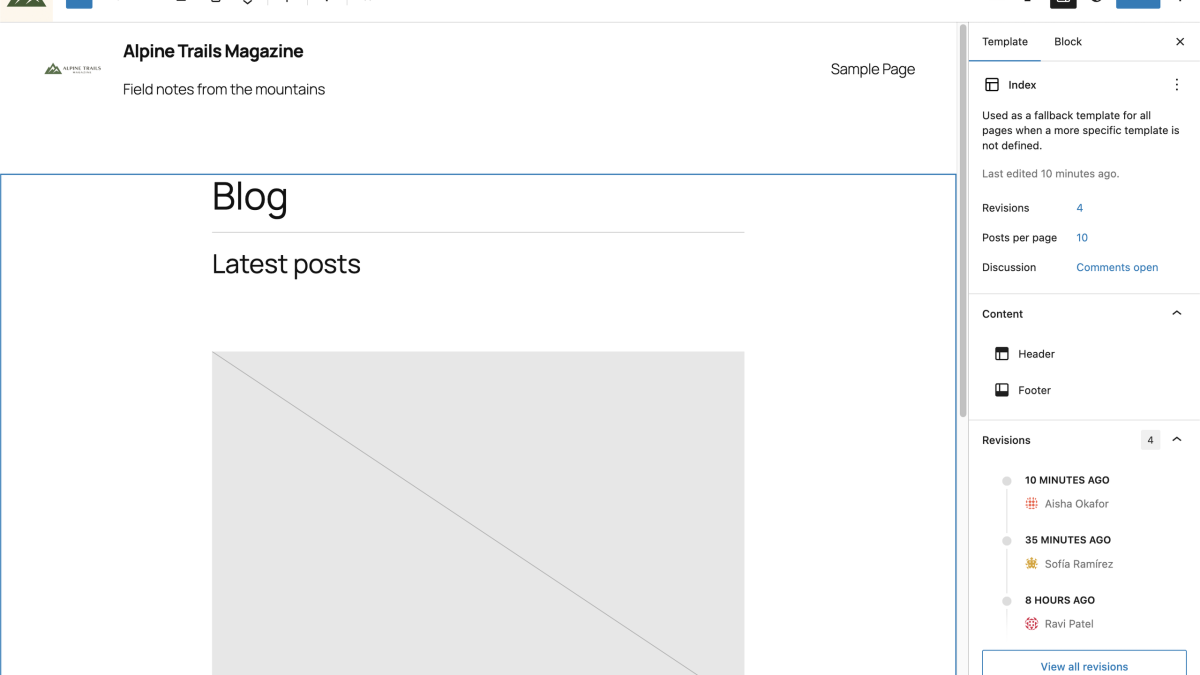
One of the most significant new features in Gutenberg 23.0 is the introduction of a revisions panel for templates, template parts, and patterns. Previously, this revision history was only available for posts and pages. Now, when editing these entities, users will find a Revisions row in the sidebar, allowing them to review and restore previous versions just as they would with traditional post types.
This addition is part of the ongoing Editor Inspector: Use DataForm experiment, which aims to unify the editing experience across all post types using a DataForm-based inspector. The feature remains experimental and can be enabled via the Gutenberg → Experiments settings. In practice, this expansion offers site builders and developers more granular control over design iteration and rollback, especially valuable for complex site templates and reusable components.
Site Title and Tagline Join the Identity Panel
The Design › Identity panel in the Site Editor, introduced in Gutenberg 22.8 with controls for Site Logo and Site Icon, now includes the Site Title and Site Tagline fields. This completes the core site identity controls into a single, cohesive panel accessible directly within the Site Editor interface.
Because these fields write to the same root/site entity that the Site Title and Site Tagline blocks reference, any changes appear live on the editor canvas. This immediate feedback loop streamlines identity customization workflows by removing the need to navigate back to the WordPress Settings → General page. The unified styling of text and media controls within this panel further enhances usability and consistency.
Real-Time Collaboration: Legacy Meta Box Compatibility and Reliability Improvements
Real-time collaboration (RTC) in Gutenberg has been extended to better accommodate legacy meta boxes. Plugin authors and site administrators can now use a new __rtc_compatible_meta_box flag to mark individual meta boxes as compatible with RTC, preventing them from disabling collaboration features. This improvement enables a smoother integration path for sites relying on older meta box implementations.
Reliability fixes have also been implemented to address issues that could cause synchronization crashes, particularly when concurrent edits affect array-type block attributes like table rows. These changes reduce the risk of disconnects during collaborative editing sessions. Additionally, the activation hook for the collaboration feature now respects the WP_ALLOW_COLLABORATION constant, providing site hosts with a dependable kill switch.
Additional Quality-of-Life Refinements in the Editor
Gutenberg 23.0 includes several smaller enhancements aimed at improving day-to-day editing. For example, move-up and move-down block toolbar buttons now display their keyboard shortcuts in tooltips, helping users discover these productivity features.
The spacing controls for blocks have been reordered when unlink mode is off, offering a more intuitive layout for adjusting margins and padding. The Separator block insertion via the Markdown-style — shortcut now applies the block’s default style variation, aligning keyboard shortcut behavior with the inserter experience.
Guidelines Experiment Internal Renaming
Users of the Guidelines experiment should note that internal identifiers have been renamed from content-guidelines/content_guideline to guidelines/guideline. This change affects several components, including the custom post type slug and REST base. After updating to 23.0, the experiment will appear disabled and must be re-enabled manually, with any previously saved guidelines needing re-entry.
What This Means for WordPress Users
Gutenberg 23.0 delivers meaningful progress toward a more unified and efficient editing experience across WordPress. The experimental revisions panel for templates and patterns is a welcome step for developers and site builders who need version control beyond posts and pages. While still early, this feature signals how WordPress is extending content management capabilities to all site components, reflecting the growing importance of full-site editing workflows.
The consolidation of site identity controls into a single Design › Identity panel streamlines site customization, reducing friction for users managing branding elements. This change aligns with broader efforts to create a cohesive Site Editor environment where most site settings can be adjusted contextually.
Enhanced real-time collaboration support for legacy meta boxes is significant for agencies and plugin developers maintaining compatibility with older code while embracing modern collaborative editing. The reliability fixes further stabilize RTC, an important consideration as collaborative workflows become more prevalent in WordPress environments.
Overall, Gutenberg 23.0’s combination of new features and refinements underscores the project’s commitment to continuous improvement based on community feedback and evolving user needs. We recommend developers and site operators test these new capabilities, especially the experimental revisions panel, to prepare for the direction of future WordPress core releases. For context, our previous coverage highlights ongoing trends in Gutenberg development that shape the editing experience.
Frequently Asked Questions
How do I enable the experimental revisions panel in Gutenberg 23.0?
You can enable the revisions panel for templates, template parts, and patterns by navigating to Gutenberg → Experiments in your WordPress dashboard and activating the relevant experiment. This will allow you to access revision history while editing these entities.
What improvements does Gutenberg 23.0 bring to real-time collaboration?
Gutenberg 23.0 improves RTC by enabling legacy meta boxes to be marked as compatible, preventing them from disabling collaboration. It also fixes synchronization bugs that could cause crashes during concurrent edits and respects the WP_ALLOW_COLLABORATION constant for better control.
Can I now edit my Site Title and Tagline directly in the Site Editor?
Yes. The Site Title and Tagline fields are now included in the Design › Identity panel of the Site Editor. Changes made here update live on the editing canvas, streamlining site identity customization without leaving the editor.
What should I do if I had the Guidelines experiment enabled before updating?
After updating to Gutenberg 23.0, the Guidelines experiment will appear disabled due to internal renaming. You need to re-enable it manually from Gutenberg → Experiments and re-enter any previously saved guidelines to continue using the feature.