End-to-end (E2E) testing is a crucial step for WordPress developers seeking to ensure their projects function correctly in real-world scenarios. While unit tests verify individual components, E2E tests simulate user interactions across the entire application stack, catching integration issues that might otherwise go unnoticed. The WordPress Developer Blog recently published a detailed guide on setting up and writing E2E tests using Playwright, a modern testing framework, specifically tailored for WordPress projects.
Key Takeaways
- Playwright enables WordPress developers to write comprehensive E2E tests covering UI interactions, block variations, and front-end outputs.
- Setting up a local WordPress environment with
wp-envstreamlines testing by providing a ready-to-use WordPress installation integrated with your project. - E2E tests complement unit tests by validating full user flows, but require careful scope selection due to their complexity and fragility.
- The Gutenberg project and WordPress Core leverage E2E tests extensively, demonstrating their importance in maintaining stability and quality.
- The guide offers practical examples, including testing custom blocks and REST API interactions, providing a solid foundation for developers to adapt to their own projects.
What Is End-to-End Testing and Why It Matters for WordPress
E2E testing sits at the top of the testing pyramid, focusing on verifying the behavior of an application as experienced by end users. Unlike unit tests, which isolate specific functions or components, E2E tests validate how multiple layers—UI, server, database, and APIs—work together. This holistic approach is essential for WordPress projects, where themes, plugins, and core features interact in complex ways.
Playwright, developed by Microsoft, is a relatively new but increasingly popular E2E testing framework that supports multiple browsers and provides reliable automation APIs. It fits well with WordPress development workflows, offering faster test execution and easier debugging compared to older tools like Selenium.
WordPress’s own projects, including the Gutenberg editor and Core itself, have integrated E2E testing as a key quality assurance strategy. The WordPress Developer Blog’s guide builds on this foundation by demonstrating how to apply Playwright to a sample project involving custom block development and REST API usage.
Setting Up Your WordPress Environment for Playwright Testing
Before writing tests, a stable WordPress environment is necessary. The guide recommends wp-env, a Docker-based local environment tool maintained by the WordPress project. It simplifies setup by spinning up a WordPress site with the required themes and plugins automatically activated.
Developers must have Git, Node.js, and Docker installed. After cloning the sample project repository, running npm install sets up dependencies, including wp-scripts and Playwright itself.
Configuring .wp-env.json maps the current folder as a theme and includes lifecycle scripts to activate the theme in both development and test environments. This integration ensures that tests run against the exact code being developed.
Starting the environment with npx wp-env start launches WordPress instances on default ports, ready for testing. Should port conflicts arise, developers can adjust the configuration or free up ports accordingly.
Writing and Running Your First Playwright E2E Test
With the environment prepared, the next step is creating tests that simulate user behaviors. The guide walks through testing a custom “Book Author” block within a sample “Book Reviews” project.
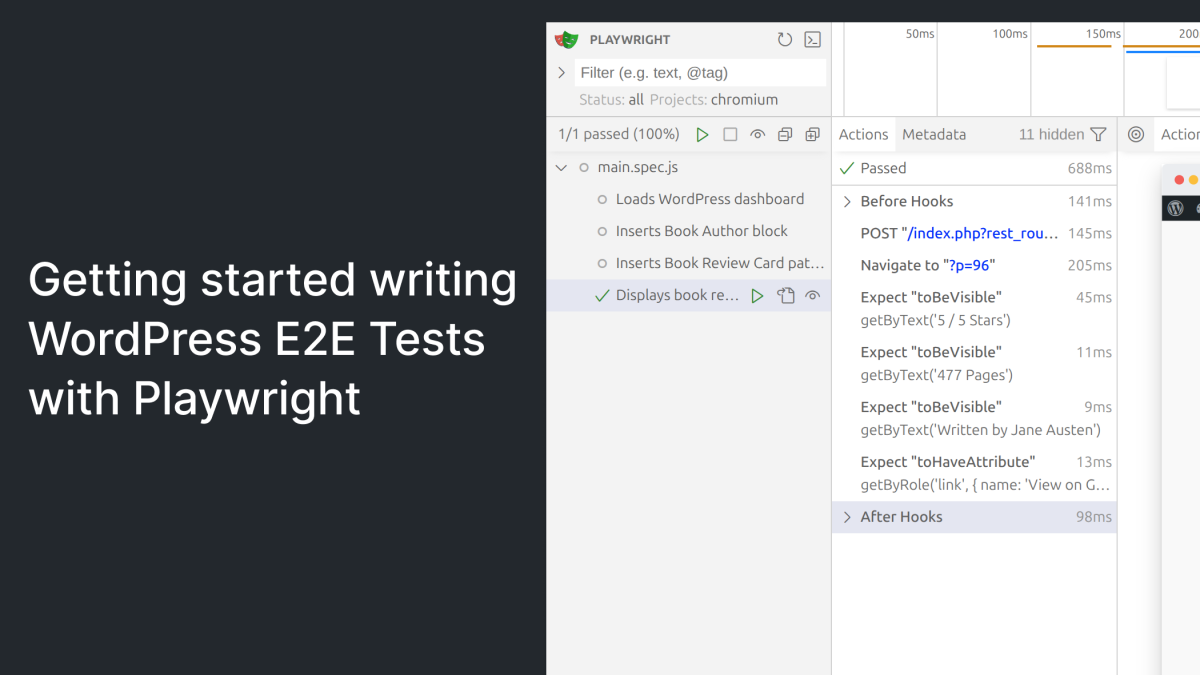
Tests begin by inserting the block into a post, then verifying its attributes and functionality through UI interactions. Playwright’s API allows assertions on rendered content and user inputs, making it straightforward to confirm that the block behaves as intended.
Running tests in UI Mode helps developers visually follow test execution and debug failures, an advantage during initial test creation.
Beyond blocks, the guide covers testing block patterns and front-end output by creating posts via the REST API and verifying meta values in the rendered HTML. This demonstrates Playwright’s capability to test not just the editor experience but also the published site, ensuring end-user experience is intact.
Challenges and Best Practices for WordPress E2E Testing
While E2E tests provide valuable coverage, they come with trade-offs. They are slower to execute and more prone to breaking from UI or backend changes. Developers should focus E2E tests on critical user flows rather than exhaustively testing every scenario.
Maintaining test stability requires good practices like isolating tests, using reliable selectors, and synchronizing with asynchronous operations. Playwright’s advanced features, such as auto-waiting and trace recording, aid in creating resilient tests.
The WordPress Developer Blog’s guide encourages pairing E2E tests with existing unit tests for a layered testing strategy that balances speed and coverage.
What This Means for WordPress Users
We see Playwright becoming an essential tool for WordPress developers serious about quality assurance. Its modern API and compatibility with WordPress’s wp-env environment lower the barrier to adopting E2E testing in plugin and theme development workflows. For agencies and freelancers, integrating E2E tests can reduce bugs that reach production, saving time and client frustration.
Site owners benefit indirectly as more developers adopt these practices, leading to more stable themes and plugins. The increased use of E2E testing in WordPress Core and Gutenberg signals a maturation of the ecosystem’s quality culture. Developers should plan to invest time in learning E2E testing frameworks like Playwright, especially for complex projects involving custom blocks or REST API interactions.
We recommend starting with critical flows, such as content creation and publishing, and gradually expanding coverage. Combining E2E tests with unit and integration tests creates a balanced safety net that can catch regressions early.
This guide also highlights the importance of leveraging official WordPress tools like wp-env for consistent local environments, which streamlines both development and testing. Overall, adopting Playwright for WordPress E2E tests is a practical step forward in improving code confidence and project maintainability.
Frequently Asked Questions
What are the main differences between unit tests and E2E tests in WordPress?
Unit tests focus on individual functions or components in isolation, ensuring they behave as expected. E2E tests simulate real user interactions across the whole application stack, validating that multiple components work together correctly.
Why use Playwright instead of other E2E testing tools?
Playwright offers faster test execution, supports multiple browsers, and provides features like auto-waiting and trace recording that make tests more reliable and easier to debug compared to older tools like Selenium.
Is wp-env mandatory for running WordPress E2E tests?
No, wp-env is recommended because it simplifies setup and integrates well with WordPress tooling, but developers can use dedicated test sites or other local environments if preferred.
How should I decide which user flows to cover with E2E tests?
Focus on critical user interactions that impact functionality and user experience, such as content creation, publishing, and key plugin features. Avoid trying to cover every edge case to keep tests maintainable and efficient.