WordPress Contributor Days are meant to inspire collaboration and help new contributors make their first core patches. Yet, for many attendees, the experience is derailed before it even begins — hours lost to troubleshooting local environment setups. A new solution, the WordPress Core Dev Environment Toolkit, promises to change that.
Key Takeaways
- The WordPress Core Dev Environment Toolkit simplifies setup for first-time contributors, eliminating complex prerequisites.
- Available for macOS, Windows, and Linux, the app bundles Git, Node.js, npm, and Docker replacements into a single package powered by WordPress Playground.
- Designed for Contributor Days, the toolkit enables attendees to go from installation to submitting their first patch in a single session.
- The app is experimental and feedback-driven, with development ongoing via GitHub.
Why the Toolkit Was Needed
Historically, setting up a WordPress core development environment has been a daunting task for newcomers. At in-person Contributor Days, participants often spend the entire session installing Git, Node.js, npm, and Docker, configuring their systems, and troubleshooting inevitable errors. This complexity creates a bottleneck that prevents many from making meaningful contributions during the event.
The WordPress Core Dev Environment Toolkit aims to address this problem head-on. It allows users to bypass these prerequisites entirely, offering a desktop application that handles the heavy lifting. By simplifying the setup process, it lowers the barrier to entry for first-time contributors and ensures that more attendees can focus on learning and contributing.
How the Toolkit Works
The toolkit is a standalone desktop application available for macOS, Windows, and Linux. It leverages WordPress Playground, a framework that runs WordPress in the browser using JavaScript and WebAssembly (WASM). This technology enables the toolkit to bundle all necessary tools — Git, Node.js, npm — into the app itself, bypassing the need for local installations.
Setup Process
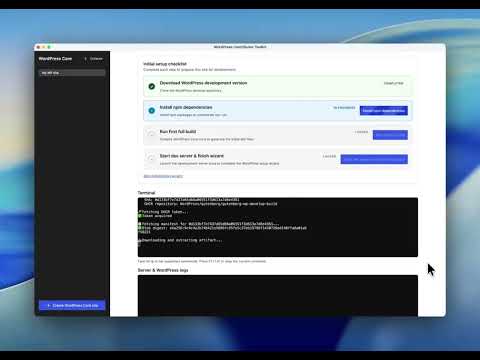
Here’s how the toolkit streamlines the setup:
- Clone the
wordpress-developrepository into a chosen directory. - Automatically run npm install, npm run build, and npm run dev.
- Start a WordPress development server using Playground’s CLI.
- Directly edit core files and generate patches ready for submission to Trac.
The entire workflow is designed to avoid terminal commands and complex configurations, making it accessible even to those with minimal technical experience.
Impact on Contributor Days
Contributor Days have always been a cornerstone of WordCamp events, fostering collaboration and onboarding new talent into the WordPress ecosystem. However, the steep learning curve of environment setup has long been a pain point. The toolkit addresses this by enabling attendees to go from installation to their first patch in a single session.
By removing the friction of setup, organizers can spend more time mentoring participants on contribution workflows and less time troubleshooting technical issues. This shift could significantly increase the number of meaningful contributions made during these events.
What This Means for WordPress Users
We view the WordPress Core Dev Environment Toolkit as a game-changer for onboarding new contributors. For developers eager to contribute to WordPress core, this tool simplifies a previously intimidating process. Agencies and plugin developers should encourage their teams to explore the toolkit, as it provides an easy way to interact with core code and understand WordPress from the inside out.
For WordCamp organizers, this toolkit is a must-have for Contributor Days. Sharing the download link ahead of the event and walking attendees through its use can transform the experience, enabling more productive sessions and greater impact.
Overall, this initiative signals WordPress’s commitment to fostering a more inclusive and accessible contributor ecosystem. If successful, it could inspire similar tools across other open-source projects.
Frequently Asked Questions
What operating systems does the toolkit support?
The WordPress Core Dev Environment Toolkit is available for macOS, Windows, and Linux.
Do I need to install Git, Node.js, or Docker to use the toolkit?
No, the toolkit bundles these tools as JavaScript/WASM within the application itself. No external installations are required.
Where can I download the toolkit?
The toolkit can be downloaded from its GitHub repository where releases and documentation are available.
Can I use this toolkit for production sites?
No, the toolkit is specifically designed for development and contributions to WordPress core. It is not intended for production environments.
How can I provide feedback?
Feedback can be submitted via GitHub issues in the toolkit’s repository or in the #core Slack channel.