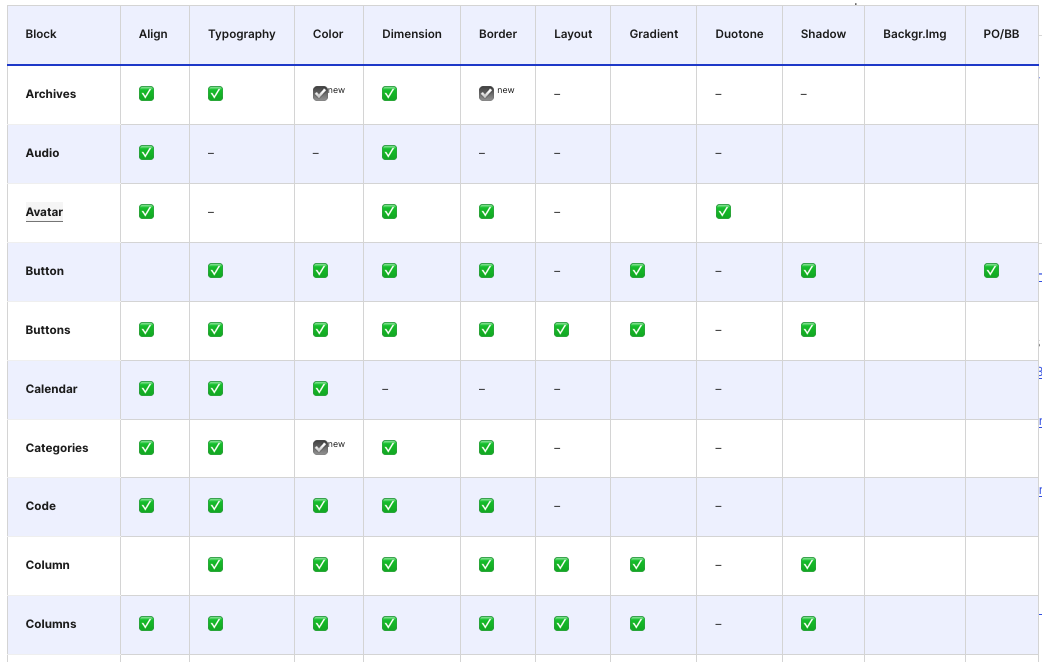
WordPress 7.0 continues to refine the block editor with a detailed and cumulative roster of design tools available per core block. This updated table, reflecting changes from WordPress 6.1 through 7.0, offers developers and site builders a clear view of which blocks support key design features such as alignment, typography, color, and layout controls.
Key Takeaways
- The updated roster lists all core blocks and their supported design tools up to WordPress 7.0, simplifying developer reference.
- New blocks like Accordion, Breadcrumbs, Icon, Math, and Post Time to Read introduce extensive design support.
- Block Bindings and Pattern Overrides now use a dynamic, opt-in system, replacing static tables for attribute support.
- The Verse block has been renamed Poetry in WordPress 7.0, aligning terminology with content semantics.
- This cumulative update reflects design improvements spanning the last ten WordPress releases, consolidating incremental enhancements.
Updated Design Support Across Core Blocks in WordPress 7.0
Since WordPress 6.1, the block editor has seen steady enhancements that broaden the design customization options available to users. The roster released alongside the 7.0 update compiles these changes into a comprehensive table that lists each core block alongside the design supports it offers. These supports include alignment, typography, color, dimension, border, layout, gradient, duotone, shadow, and background image controls.
For WordPress professionals, this table serves as a practical resource to quickly verify which blocks can be styled with which tools without having to test in the editor directly. It also highlights which features are newly introduced in the latest releases, marked with icons to signal additions in versions 6.9 and 7.0.
Notable Changes and New Blocks in WordPress 7.0
WordPress 7.0 introduces several new blocks and renames existing ones to better reflect their usage and semantics. The Verse block, known for poetry and preformatted text, has been renamed Poetry to clarify its purpose.
Newly added blocks with substantial design tool support include Accordion (with Accordion Heading, Accordion Item, and Accordion Panel sub-blocks), Breadcrumbs, Icon, Math, Post Time to Read, and Term Query blocks with associated templates and counts. These additions expand the block editor’s capability to handle more complex content structures with consistent design controls.
Dynamic Support for Block Bindings and Pattern Overrides
Earlier versions of the roster featured a column tracking Pattern Overrides and Block Bindings for a small set of blocks like Button and Image. This static approach no longer reflects the current architecture.
Starting with WordPress 6.9, Block Bindings were moved to a server-communicated list of supported attributes using the block_bindings_supported_attributes filter. WordPress 7.0 extends this mechanism to Pattern Overrides, enabling any block attribute that opts into Block Bindings to also support Pattern Overrides. This change applies to both core and custom blocks, providing developers with granular opt-in control per block, attribute, and site.
Because of this dynamic opt-in design, a single check mark in a table cannot accurately represent Block Bindings and Pattern Overrides support anymore. Consequently, the roster removes this column and instead directs readers to the official dev notes for detailed information on these features.
Implications of the Design Tools Roster for Development and Site Building
This updated roster offers a snapshot of the block editor’s expanding design capabilities and serves as a reference point for developers working on themes, custom blocks, or site customizations. Knowing exactly which design supports are available per block helps optimize user experience by aligning block usage with available styling options.
Additionally, the dynamic approach to Block Bindings and Pattern Overrides encourages developers to actively opt-in to these advanced features, fostering more intentional and maintainable design customizations. This shift also impacts pattern and block authorship workflows, as support can now be tailored and extended more flexibly.
For site builders and agencies, awareness of these design supports can guide block selection and custom block development, ensuring that design consistency is achievable without resorting to custom CSS or workarounds.
What This Means for WordPress Users
WordPress 7.0’s cumulative roster of design tools per block signals a maturation of the block editor’s styling system. For developers, this means deeper integration points to leverage design attributes programmatically and to build richer, more customizable blocks that fit specific use cases.
Site owners and agencies benefit from a clearer understanding of which blocks support which design features, enabling smarter choices during site building and customization. This reduces guesswork and speeds up workflows, especially when working with complex layouts or custom patterns.
The dynamic opt-in model for Block Bindings and Pattern Overrides also indicates a move towards more modular and scalable block design strategies. Developers should familiarize themselves with the new mechanisms to fully exploit these capabilities and contribute to a more consistent user experience across sites.
Overall, this update reflects the WordPress project’s commitment to incremental, transparent improvements that empower all users—from developers to content editors—with more control and clarity around block design.
Frequently Asked Questions
What are Block Bindings and Pattern Overrides in WordPress?
Block Bindings allow blocks to connect specific attributes dynamically to patterns or templates, enabling automatic updates when patterns change. Pattern Overrides let users customize these patterns on a per-site or per-block basis. Both enhance flexibility and consistency in block design.
Which new blocks in WordPress 7.0 have expanded design support?
WordPress 7.0 introduces new blocks like Accordion (with sub-blocks), Breadcrumbs, Icon, Math, and Post Time to Read, all featuring broad design tool support such as alignment, color, and layout controls.
How can developers enable Block Bindings and Pattern Overrides for custom blocks?
Developers can opt-in to Block Bindings and Pattern Overrides by using the block_bindings_supported_attributes filter to specify which block attributes support these features, allowing granular control per block and attribute.
Why was the Verse block renamed to Poetry in WordPress 7.0?
The rename clarifies the block’s intended use for poetry and preformatted text, aligning the block’s name with its semantic purpose and improving content clarity for users.