June 2026 marks a pivotal month for WordPress developers as the ecosystem adapts to WordPress 7.0 “Armstrong” and prepares for the next major iteration, 7.1. With key updates in Gutenberg, media processing, and plugin compatibility, the development landscape is shifting in ways that demand attention from agencies, plugin authors, and hosting providers alike.
- WordPress 7.0 “Armstrong” is stable; testing plugins/themes against it is critical now.
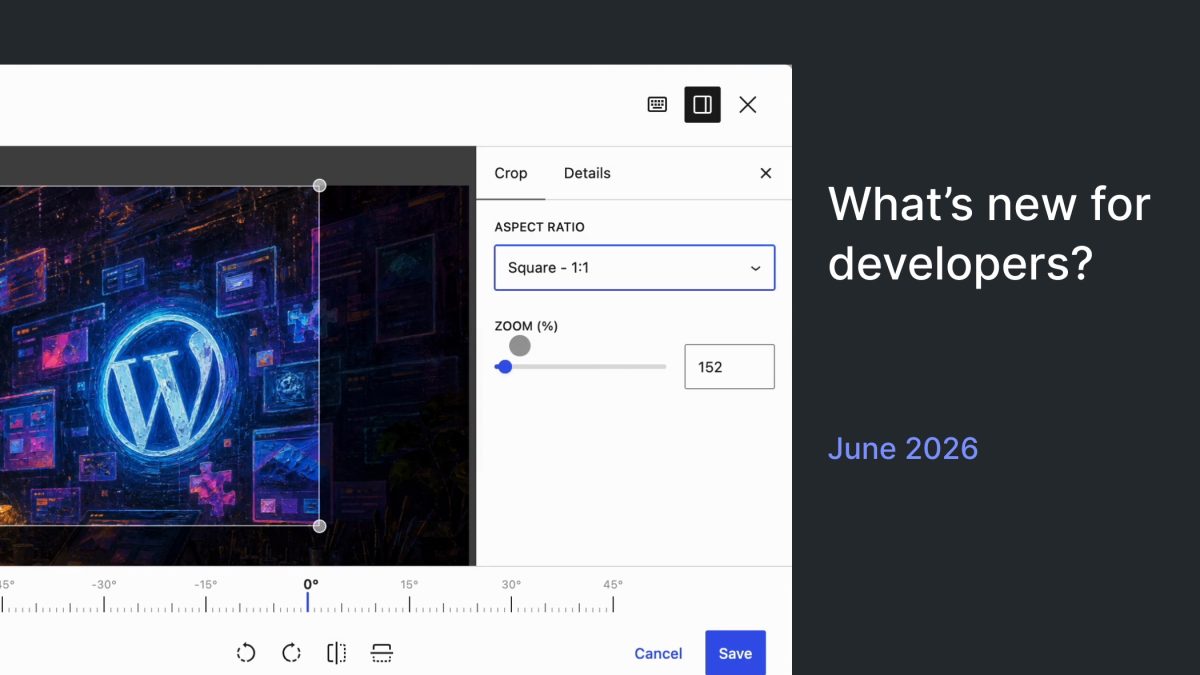
- Gutenberg 23.3 introduces a media editor modal, changing image crop workflows with UI and metadata impact.
- Client-side media processing using VIPS/WASM is ready for testing but limited to Chromium browsers and certain hardware conditions.
- React 19 upgrade is postponed but remains a key compatibility concern for plugins using JSX and @wordpress/element.
- Collaborative editing for WordPress 7.1 is in early outreach—plugin authors should test for state and save behavior changes.
What Happened
WordPress 7.0 “Armstrong” officially launched on May 20, 2026, finalizing months of development focused on editor improvements, AI API integrations, and accessibility enhancements. Concurrently, Gutenberg versions 23.2 and 23.3 shipped major editor updates, notably the introduction of a media editor modal that redefines image cropping and metadata editing workflows.
Client-side media processing has entered a testing phase with a new VIPS/WASM pipeline that generates image sub-sizes on the client side in supported Chromium browsers. The fallback to server-side processing remains for unsupported browsers and lower-end devices. This feature targets improved performance and modern image format support including AVIF, WebP, HEIC, and JPEG XL.
React 19 compatibility remains under scrutiny. Although the upgrade was temporarily reverted in Gutenberg due to plugin conflicts and JSX runtime issues, the Core team plans an incremental approach toward a full React 19 rollout in WordPress 7.1.
In parallel, the Abilities API has seen refinements with new lifecycle filters, validation mechanisms, and improved REST schema handling. PHP support labels have been clarified: WordPress 7.0 fully supports PHP 8.5, retiring previous “beta” labels. The minimum supported PHP version is now 7.4, with PHP 8.3 recommended.
Early collaborative editing efforts for WordPress 7.1 have begun outreach to gather developer feedback on state management and editor save workflows.
Why This Matters
For agencies managing multiple client sites, WordPress 7.0’s release is more than a routine upgrade. It consolidates AI APIs and expands editor capabilities, affecting how custom blocks, design tools, and accessibility features function. The changes in block registration and DataViews directly influence how developers architect dynamic content and data-driven blocks.
The media editor modal in Gutenberg 23.3 marks a significant UX and technical shift in image handling. Moving cropping and metadata editing into a dedicated modal improves workflow clarity but also introduces new accessibility and interaction considerations. Plugins that hook into media metadata or image editing must carefully test keyboard navigation, touch support, and metadata preservation. This change may uncover edge cases around image metadata consistency in production environments.
Client-side media processing using VIPS/WASM is a major architectural advancement. By offloading image resizing and format conversions to the browser, server load can decrease and user upload latency can improve—particularly for high-resolution images and next-gen formats. However, its current browser and hardware restrictions mean fallback scenarios remain essential. Hosting providers and plugin developers must validate these fallbacks to avoid degraded user experiences, especially on Firefox, Safari, or low-memory devices.
The React 19 upgrade saga highlights the complexity of maintaining compatibility across WordPress’s vast plugin ecosystem. The temporary rollback underscores the risk of breaking changes in UI rendering libraries. Plugin authors relying on JSX compilation and @wordpress/element must prioritize testing and code updates to avoid runtime errors. The incremental approach for React 19 in WordPress 7.1 suggests a more cautious, compatibility-first strategy from Core.
Refinements to the Abilities API and clearer PHP version support labels enhance developer confidence in capability-based authorization and runtime environment assumptions. Plugins and themes can now target PHP 8.5 features with less concern about backward compatibility. The Abilities API updates reduce security risks by enforcing stricter input/output validation and REST API schema integrity.
Early collaborative editing outreach signals the future direction of WordPress as a real-time multi-user platform. Although not production-ready, this work will affect plugins that manage editor state, meta boxes, or save handlers. Developers should anticipate changes in editor state persistence and synchronization mechanisms.
What This Means for WordPress Users
Should You Care? Absolutely. WordPress 7.0 and the accompanying Gutenberg updates introduce changes that impact plugin stability, media workflows, and editor behavior. Ignoring these updates risks compatibility issues, degraded performance, or broken user experiences.
Should You Act? Yes. Plugin and theme developers must test their codebases against WordPress 7.0, Gutenberg 23.3, and the latest testing builds for 7.1. Pay special attention to media editing workflows, React compatibility, and Abilities API changes. Hosting providers should validate client-side media processing fallbacks and monitor server load impacts.
What Should You Change?
- Update plugin and theme PHP version requirements to align with WordPress 7.0’s support for PHP 8.5.
- Adapt image editing and metadata handling to the new media editor modal, ensuring accessibility and interaction compliance.
- Prepare for React 19 by auditing JSX usage and @wordpress/element dependencies; avoid deprecated React methods.
- Monitor client-side media processing adoption and test your uploads on Chromium browsers; confirm fallback behavior on others.
- Engage with collaborative editing test builds if your plugin manipulates editor state or save routines.
Frequently Asked Questions
- What impact does the media editor modal have on custom image handling plugins?
- Plugins that customize image cropping or metadata must update to support the modal interface, including keyboard navigation and metadata synchronization, to maintain compatibility and accessibility.
- Is client-side media processing ready for production use?
- No. It is currently in testing and limited to Chromium browsers on devices with adequate RAM. Plugins and hosts should test fallback mechanisms thoroughly before relying on it.
- How should plugin authors prepare for React 19?
- Review and refactor code to avoid deprecated React lifecycle methods and APIs, especially if using JSX or @wordpress/element. Follow Core updates on the incremental React 19 rollout.
- What changes are there in PHP support for WordPress 7.0?
- WordPress 7.0 fully supports PHP 8.5; minimum supported version is 7.4, with 8.3 recommended. Plugin and theme authors should update their compatibility notes accordingly.
- When will collaborative editing be production-ready in WordPress?
- Collaborative editing is currently in outreach and experimental testing for WordPress 7.1. Production-ready status is not yet announced, so developers should test but avoid production dependencies.