WordPress is entering a new era of accessibility and personal creativity with the launch of my.WordPress.net. This innovative browser-based WordPress experience eliminates traditional barriers like hosting setup, domain decisions, and signup requirements, allowing users to start creating instantly, privately, and persistently.
Key Takeaways
- WordPress now runs entirely in your browser with my.WordPress.net, removing hosting and signup barriers.
- Sites created on my.WordPress.net are private, persistent, and designed for personal use rather than public sharing.
- An integrated App Catalog showcases new ways to use WordPress as a personal workspace, including CRM, RSS reading, and AI-powered customization.
- my.WordPress.net updates the spirit of the five-minute install for a browser-first web environment.
Revolutionizing WordPress: What Is my.WordPress.net?
my.WordPress.net represents a fundamental shift in how people interact with WordPress. Built on the WordPress Playground technology, it offers an instant, browser-based WordPress environment that stays with you across sessions. Unlike traditional WordPress installations, there’s no need for hosting, domains, or even a user account. Users can launch a complete WordPress environment directly in their browser and begin creating immediately.
The idea harkens back to the simplicity of WordPress’s famous five-minute install, but adapts it for the modern web. Instead of focusing on public publishing, my.WordPress.net repositions WordPress as a personal digital space—a sandbox for experimentation, creativity, and learning.
Key Features of my.WordPress.net
Persistent Browser-Based WordPress
Unlike temporary WordPress demos, environments created on my.WordPress.net are persistent and private. All files and data are stored locally within your browser, ensuring complete ownership and security. While this approach limits public visibility, it opens new possibilities for using WordPress as a personal workspace.
Private by Default
Sites created using my.WordPress.net are not accessible from the public internet and are optimized for personal rather than public use. This enables users to draft, organize, and experiment freely without concerns about traffic or visibility.
App Catalog
The integrated App Catalog brings pre-configured WordPress experiences designed for personal use, such as:
- Personal CRM: Manage personal relationships with reminders and communication pattern analysis.
- RSS Reader: Use the Friends plugin for private, algorithm-free content consumption.
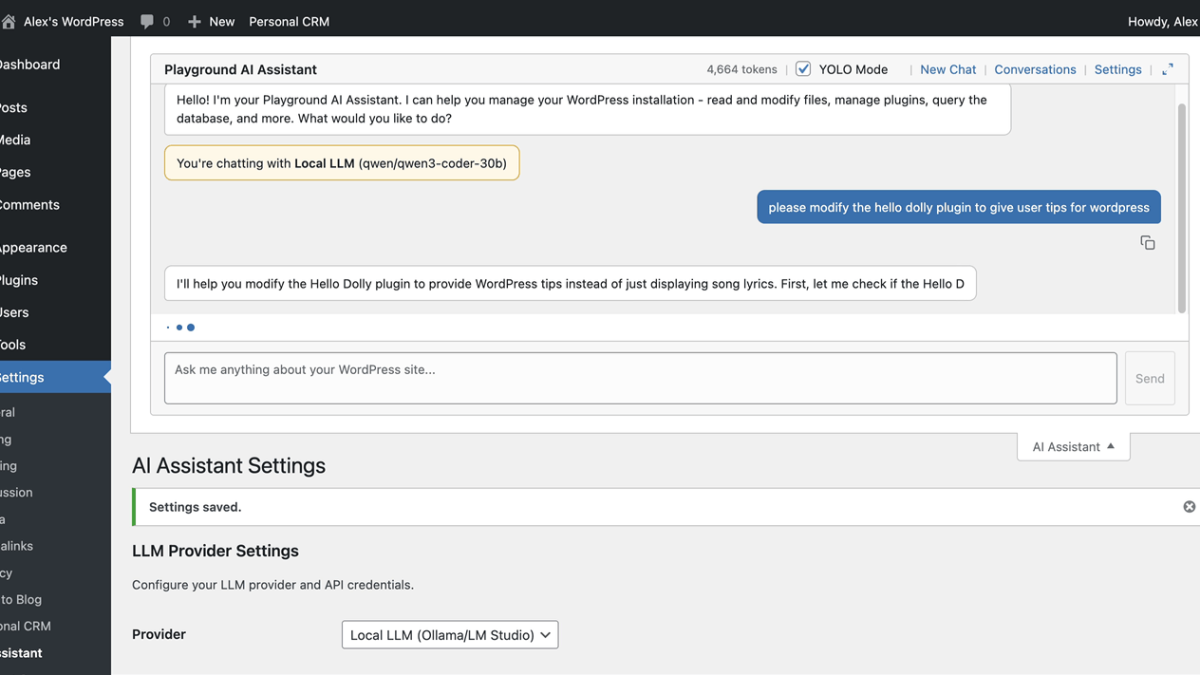
- AI Workspace: Leverage AI to modify plugins, create custom blocks, and turn WordPress into a personal knowledge base.
What This Means for WordPress Users
my.WordPress.net signals a major evolution in how WordPress can be used. For developers and creators, the platform offers a low-commitment way to experiment with themes, plugins, and customizations without worrying about breaking a live site. Agencies may find it useful for prototyping ideas or training team members in a safe, disposable environment.
For individuals, my.WordPress.net transforms WordPress into a personal digital workspace—a place to draft ideas, manage private projects, or explore new technologies without any upfront costs. It removes barriers for newcomers and makes WordPress an even more accessible tool for creativity and learning.
We believe this development expands WordPress’s identity from a publishing platform to a broader tool for personal digital sovereignty. It’s an exciting step forward that reimagines the platform’s potential.
Frequently Asked Questions
How do I access my.WordPress.net?
Simply visit my.WordPress.net in your browser to start using the service. No signup or installation is required.
Are websites created on my.WordPress.net publicly accessible?
No, sites are private by default and stored locally in your browser. They are not accessible from the public internet.
What happens if I clear my browser data?
Clearing browser data will erase your my.WordPress.net environment. Be sure to download backups regularly to preserve your work.
Can I install plugins and themes on my.WordPress.net?
Yes, you can install plugins and themes directly within the environment, just like on traditional WordPress installations.
Is my.WordPress.net free to use?
Yes, my.WordPress.net is free. However, additional storage or advanced features may require payment in the future.