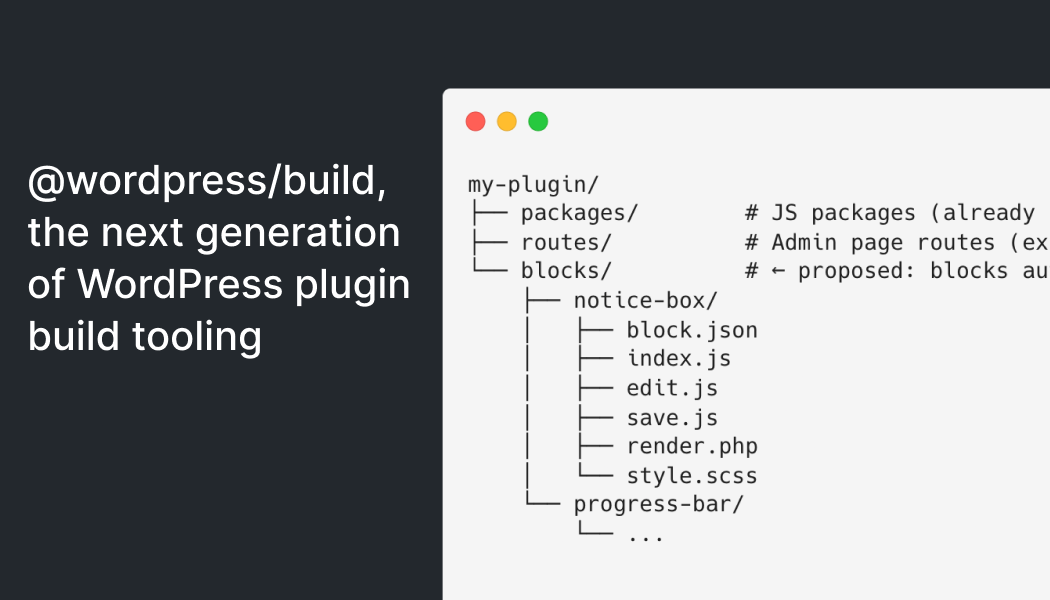
WordPress is ushering in a new era of plugin development tooling with the introduction of @wordpress/build. Designed to simplify workflows, reduce build times, and shift from configuration-based setups to convention-based ones, this tool represents a significant upgrade in how WordPress plugins are built and maintained. While developers using @wordpress/scripts can continue their current workflows without disruption, @wordpress/build is set to become the underlying engine driving faster builds, auto-generated PHP registration, and standardized folder-based discovery.
Key Takeaways
@wordpress/buildreplaces webpack and Babel with faster, convention-driven tooling powered by esbuild.- The tool auto-generates PHP registration files based on folder structure and
package.jsonconventions. - Gutenberg already uses
@wordpress/buildfor its 100+ JavaScript packages, proving its scalability. - The API is still evolving, and feedback from plugin developers is critical to shaping its future.
- Block plugin structure and registration remain a key area for improvement before wider adoption.
What Is @wordpress/build?
Historically, WordPress plugin developers relied on @wordpress/scripts, which abstracted webpack configurations and Babel transpilation for modern JavaScript development. However, as tools evolved, the complexity of @wordpress/scripts grew, and its flexibility often led to convoluted setups. Gutenberg itself never used @wordpress/scripts, relying on custom tooling instead.
This gap prompted Riad Benguella’s proposal for a v2 version of WordPress build tooling, leading to the introduction of @wordpress/build in October 2025. The tool reimagines the developer experience with a convention-driven approach. Instead of configuring entry points and dependencies manually, developers simply organize code into predefined folders such as packages/, routes/, and soon blocks/. From there, the tool automatically discovers, compiles, and registers everything required.
How @wordpress/build Improves Workflow
At the heart of @wordpress/build is esbuild, a highly optimized bundler written in Go. Esbuild eliminates the need for separate webpack and Babel pipelines, enabling builds to complete in seconds rather than minutes. Developers working on large projects, such as Gutenberg’s 100+ packages, benefit from near-instant feedback loops during development thanks to incremental rebuilds in watch mode.
Another standout feature is auto-generated PHP registration. By reading package.json fields, the tool can produce registration files for blocks, scripts, and admin routes without manual coding. This reduces human error and ensures consistency across deployments.
Current Limitations and Areas for Feedback
While the tool is functional and already in use within Gutenberg, it is not yet ready for every use case. Block plugin developers, in particular, face challenges due to gaps in automatic registration workflows. Proposed features like a blocks/ folder for block discovery are still under discussion.
Another limitation is the rigid folder structure. The tool mandates specific directory names (packages/, routes/, etc.), which cannot be customized. Developers with existing projects that use different naming conventions must restructure their codebases to adopt @wordpress/build.
What This Means for WordPress Users
For plugin developers, @wordpress/build represents a promising shift towards faster, more streamlined workflows. If your plugin relies heavily on JavaScript, adopting this tool can drastically reduce build times and simplify maintenance. However, developers should be prepared for some restructuring, especially if their current projects do not follow the tool’s folder conventions.
We recommend monitoring the ongoing development of @wordpress/build and engaging with the project now while its API is still being shaped. Feedback from real-world plugin use cases is essential to ensure the tool meets the diverse needs of the WordPress ecosystem.
For site operators and agencies, this shift signals a future where plugin development becomes more standardized and efficient, leading to higher-quality plugins and faster updates.
Frequently Asked Questions
What is the main advantage of @wordpress/build?
The main advantage is its speed and simplicity. It uses esbuild for faster builds and convention-based discovery to eliminate complex configurations.
Does @wordpress/build replace @wordpress/scripts?
Not immediately. @wordpress/build will eventually become the engine underneath @wordpress/scripts, but current workflows remain unchanged.
Can I use @wordpress/build for block registration?
Not yet. Automatic block registration workflows are still under development, requiring manual workarounds for now.
Does the folder structure need to change?
Yes. The tool relies on fixed folder names like packages/ and routes/. Existing projects with different structures must adapt.