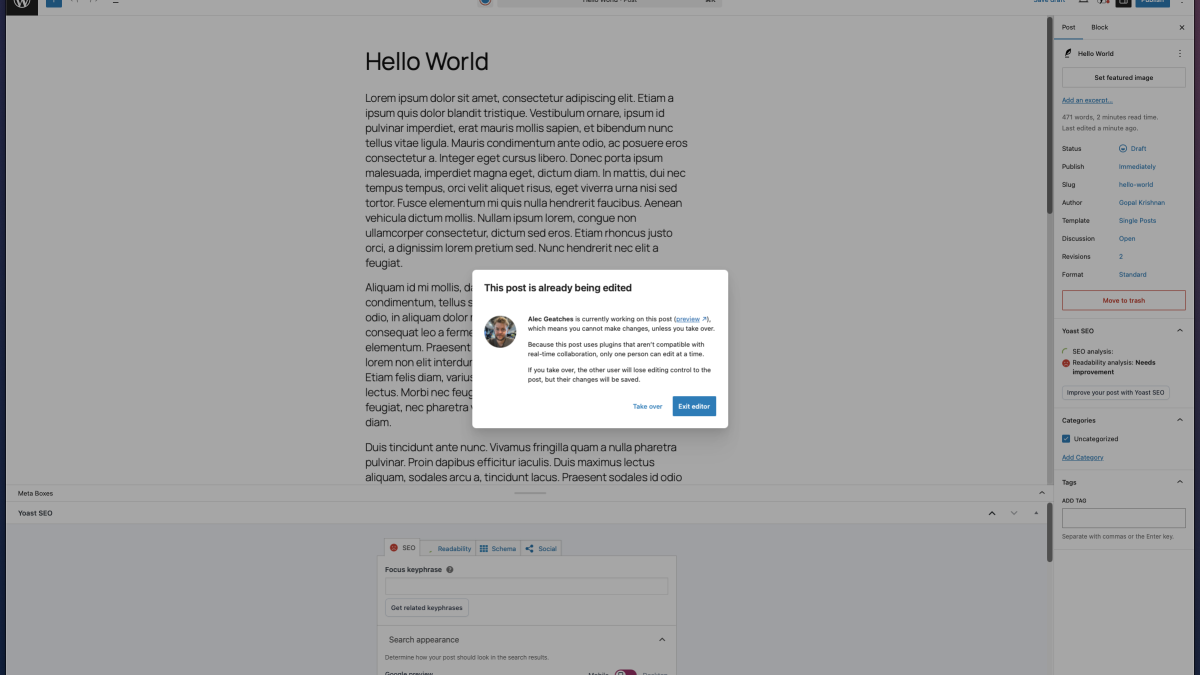
Real-time collaboration in the WordPress block editor is set to change how developers and users interact with content. By leveraging Yjs, multiple users can now edit content simultaneously, creating new dynamics in content management.
The recent announcement from WordPress details how this feature affects plugin and theme developers. Key points include handling meta boxes, utilizing the sync.providers filter, and addressing common development challenges in a collaborative environment.
A Challenge with Meta Boxes
Meta boxes, a classic feature in WordPress, present a challenge for real-time collaboration. These are not synced by the new system, leading to potential data loss. Consequently, collaboration is disabled when meta boxes are detected on a post. Developers are advised to migrate from meta boxes to registered post meta with the show_in_rest attribute set to true. This migration enables data to sync effectively, promoting a more seamless collaborative experience.
For instance, developers can register post meta using:
register_post_meta( 'post', 'example_subtitle', { 'show_in_rest': true, 'single': true, 'type': 'string', 'revisions_enabled': true });To aid this transition, developers should refer to the Meta Boxes guide in the Block Editor Handbook.
Customizing Real-Time Sync with sync.providers
The @wordpress/sync package introduces a provider-based architecture for syncing collaborative data. By default, WordPress uses an HTTP polling provider, but the sync.providers filter allows developers to replace this with custom solutions like WebSockets for lower-latency collaboration.
Using WebSockets, for example, reduces latency significantly. Developers can implement this by creating a WebSocket provider:
import { addFilter } from '@wordpress/hooks'; import { WebsocketProvider } from 'y-websocket'; function createWebSocketProvider( { awareness, objectType, objectId, ydoc } ) { const roomName = `${ objectType }-${ objectId ?? 'collection' }`; const serverUrl = 'wss://example.com/'; const provider = new WebsocketProvider( serverUrl, roomName, ydoc, { awareness } ); return { destroy: () => { provider.destroy(); }, on: ( eventName, callback ) => { provider.on( eventName, callback ); }, }; } addFilter( 'sync.providers', 'my-plugin/websocket-provider', () => { return [ createWebSocketProvider ]; } );This flexibility allows developers to tailor the sync transport layer to their specific needs, optimizing performance and user experience.
Development Challenges in a Collaborative Environment
Building plugins for real-time collaboration introduces unique challenges. All connected editors share the same data state, necessitating careful handling of post data. Plugins must use controlled input components and derive input values directly from the WordPress data store using useSelect.
For example, syncing custom post meta values requires:
const metaValue = useSelect( select => select( 'core/editor' ).getEditedPostAttribute( 'meta' )?.example_subtitle, []); { editPost( { meta: { example_subtitle: event.target.value } } ); } }/>Furthermore, developers should avoid using local component state for shared data to prevent stale or conflicting data issues.
What To Do
- Plugin Developers: Migrate meta box functionality to registered post meta with show_in_rest set to true.
- Theme Developers: Consider block-based alternatives for meta boxes to enable collaboration.
- All Developers: Utilize the sync.providers filter to customize sync transport for better performance.