WordPress developers can now register blocks purely with PHP, eliminating the need for JavaScript in certain cases. This advancement simplifies block creation for server-side rendered blocks, opening new possibilities for plugin and theme development.
Key Takeaways
- WordPress Core now supports PHP-only block registration for server-side rendered blocks.
- The new autoRegister flag in register_block_type enables automatic editor integration.
- Custom controls for block attributes will be auto-generated in the sidebar, with limitations.
- This feature targets developers creating non-interactive blocks needing simple server-side rendering.
- Backward compatibility concerns are minimal, but developers must provide a render_callback.
What Is PHP-Only Block Registration?
The WordPress Core team has introduced a new feature that allows developers to register blocks using only PHP. Traditionally, block registration required JavaScript, making it more challenging to create server-side rendered blocks. With this update, developers can use the register_block_type function with the autoRegister flag to bypass JavaScript entirely.
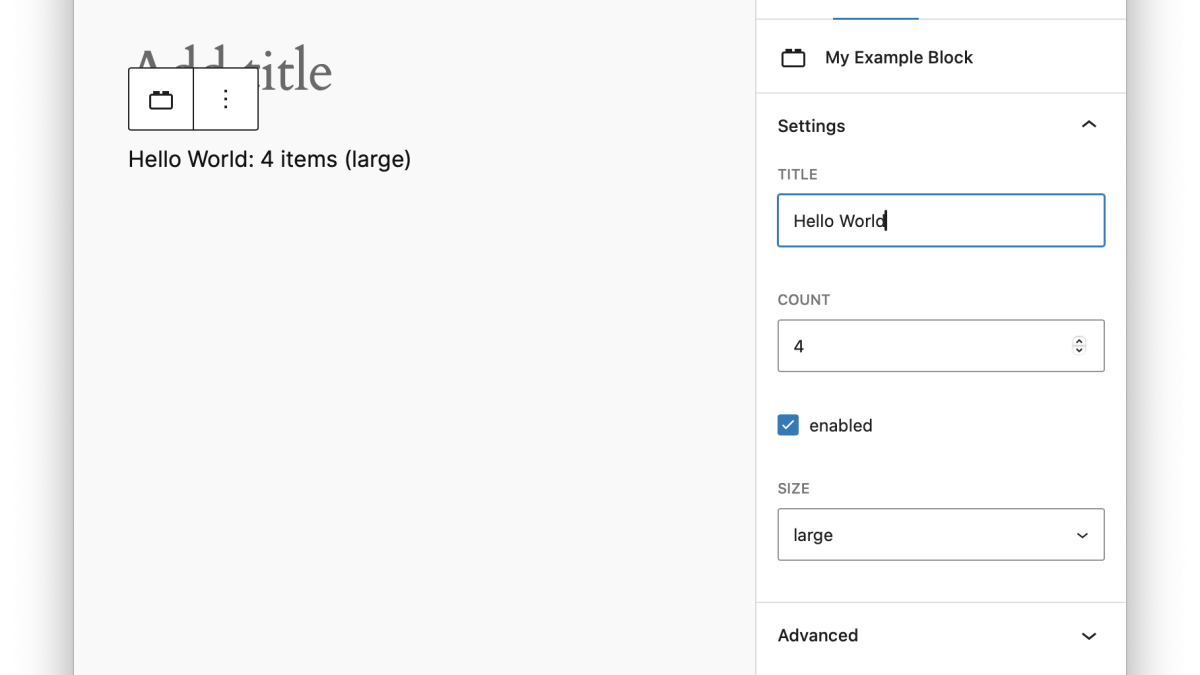
This approach is ideal for blocks that are not reliant on client-side interactivity. For example, blocks that display data fetched from the server or generate static elements based on user input are prime candidates for PHP-only registration. The system generates block controls in the editor automatically, facilitating user customization without additional coding.
The feature includes limitations. Controls cannot be auto-generated for attributes using the local role or unsupported types. Developers must provide a render_callback function to dictate how the block output is rendered.
How PHP-Only Blocks Work
To register a PHP-only block, developers call register_block_type with the autoRegister flag set to true. Here’s an example:
function gutenberg_register_php_only_blocks() {
    register_block_type( 'my-plugin/example', array(
        'title' => 'My Example Block',
        'attributes' => array(
            'title' => array(
                'type' => 'string',
                'default' => 'Hello World',
            ),
            'count' => array(
                'type' => 'integer',
                'default' => 5,
            ),
            'size' => array(
                'type' => 'string',
                'enum' => array( 'small', 'medium', 'large' ),
                'default' => 'medium',
            ),
        ),
        'render_callback' => function ( $attributes ) {
            return sprintf( '%s: %d items (%s)',
                esc_html( $attributes['title'] ),
                $attributes['count'],
                $attributes['size']
            );
        },
        'supports' => array(
            'autoRegister' => true,
        ),
    ));
}
add_action( 'init', 'gutenberg_register_php_only_blocks' );
In this example, the block attributes title, count, and size are defined with default values and constraints. The render_callback function generates HTML based on these attributes, ensuring the block renders correctly on the front end.
Why This Matters for Developers
The introduction of PHP-only block registration is a significant step forward for WordPress development. It reduces complexity for server-side blocks, especially for developers who prefer PHP or lack JavaScript expertise. This feature is particularly useful for projects that prioritize server-side rendering or need minimal interactivity.
Additionally, the automatic generation of editor controls streamlines the development process. Developers can focus on backend logic while relying on WordPress to handle editor-side attribute management. However, it’s crucial to understand the limitations, such as unsupported attribute types and the requirement for a render_callback.
What This Means for WordPress Users
For developers, PHP-only block registration simplifies workflows, enabling faster block creation for server-side rendered content. Agencies and freelancers working on custom plugins or themes will find this feature particularly beneficial for reducing development time while maintaining functionality.
Site owners may see more lightweight plugins and themes emerge, as developers can now focus solely on PHP-based solutions for simpler blocks. This could translate into better performance and fewer dependencies overall.
From an ecosystem perspective, this change aligns with WordPress’s ongoing effort to make block development accessible to a broader audience, including PHP-first developers.
Frequently Asked Questions
What are PHP-only blocks?
PHP-only blocks are blocks registered entirely through PHP, without requiring JavaScript for their definition. They are ideal for server-side rendered blocks.
How does the autoRegister flag work?
Setting the autoRegister flag to true in register_block_type automatically registers the block in the editor without additional JavaScript.
Can all block attributes generate editor controls?
No, controls are not auto-generated for attributes with the local role or unsupported types.
Do PHP-only blocks support dynamic content?
Yes, PHP-only blocks can dynamically render content using the render_callback function.